Open this article in your favourite assistant
Get an instant summary, or save it as a source your AI can cite later.
A kurta brand in Jaipur was running 2,600 orders a month, 71% COD. They had an outsourced calling centre doing order verification. IVR pickup rate: 7%. Out of roughly 1,850 COD orders per month, they were confirming maybe 130. The other 1,720 shipped unverified.
RTO rate: 36%. That is 936 returns a month. At ₹310 per RTO, that is ₹2.9 lakh in direct logistics cost every 30 days, before touching product damage and repackaging costs.
In early 2026, they switched to WhatsApp verification. One template message, sent 5 minutes after order placement. Response rate in week one: 58%. Confirmation rate among responders: 88%. By week four, 63% of COD orders were being verified.
Three months in: RTO dropped from 36% to 21%. Monthly logistics savings: roughly ₹1.2 lakh. The WhatsApp automation cost roughly ₹9,200 per month. Net saving: over ₹1.1 lakh.
The change was not AI. It was a 180-character message with two buttons.
Below are five templates that work across different COD scenarios, plus the full automation flow, timing guidance, response handling, and benchmarks to measure against. Copy the templates, adapt the variables to your Shopify setup, and submit to Meta as utility messages.
Why WhatsApp Beats IVR and SMS for COD Verification
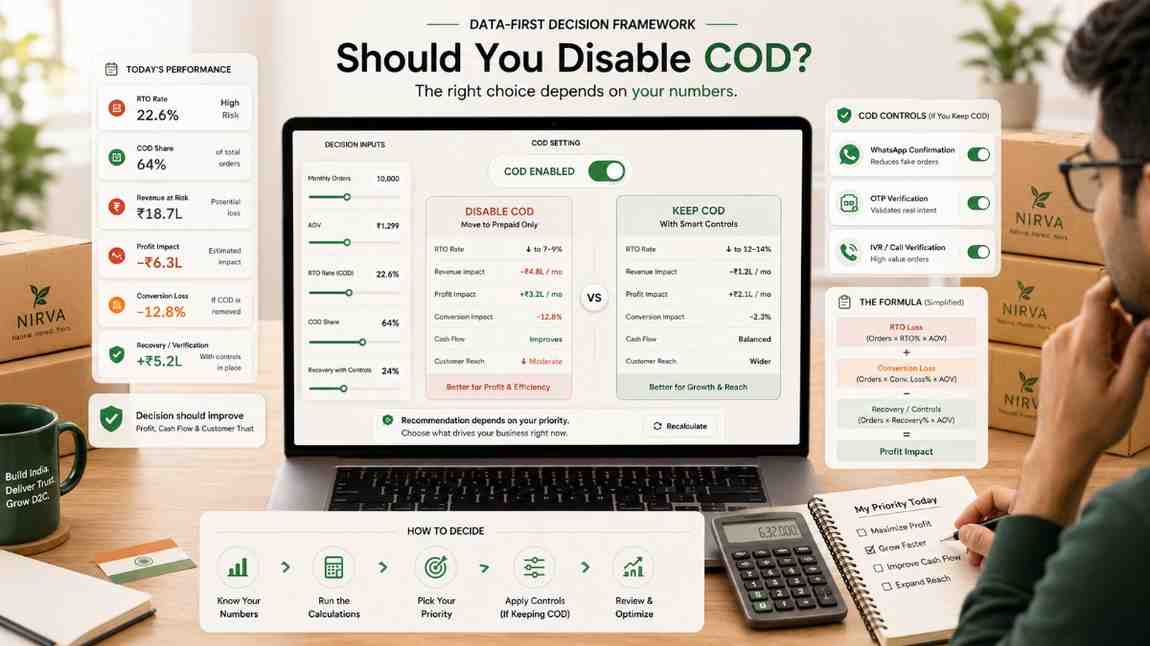
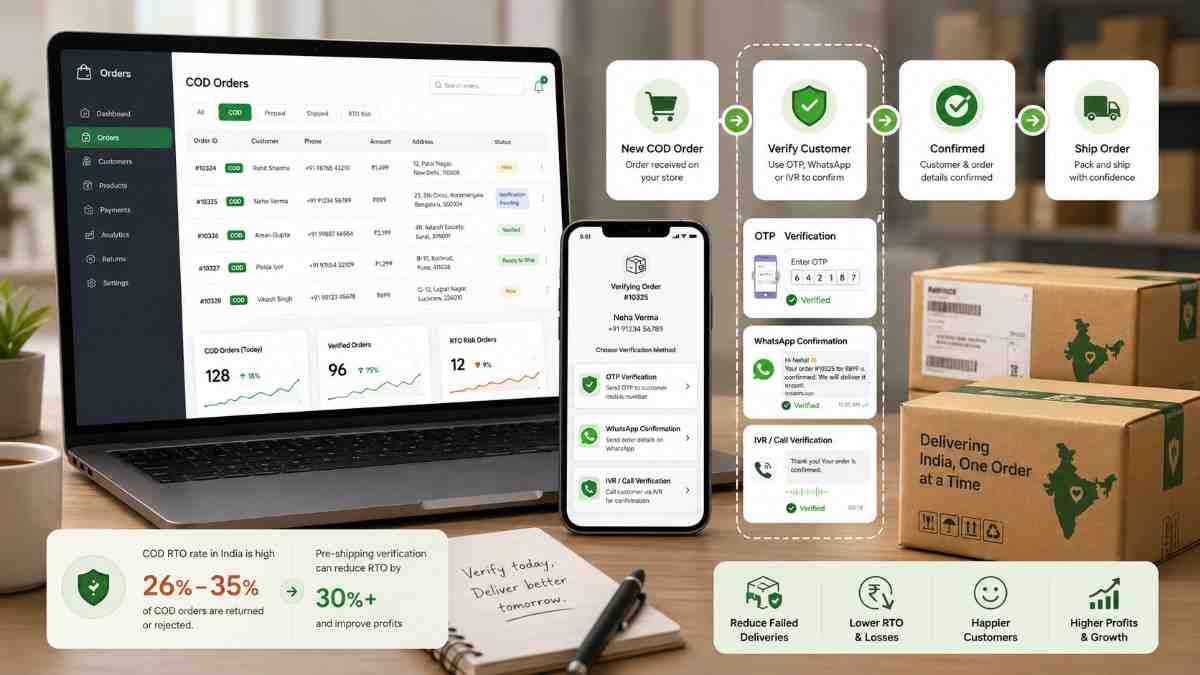
The question is not whether to verify COD orders. A 26% average RTO rate on unverified COD makes the economics obvious. The question is which channel actually reaches customers.
IVR pickup rate in India sits at 5 to 8%. Most customers see an unknown number from a calling centre and decline. Even those who pick up typically hang up at an automated prompt. You are paying per call for verification that is not happening.
SMS read rate is around 12%. The message lands in a promotions folder, gets filtered by spam detection, or sits unread for days. Most customers check WhatsApp dozens of times daily.
WhatsApp open rate: 85% within 3 minutes, 98% total. But the bigger advantage over SMS and IVR is the quick reply button. Confirming via WhatsApp requires a single tap, no typing, no keypad input. That is why WhatsApp response rates on COD confirmation run 8 to 10x higher than IVR.
The cost difference is equally clear. WhatsApp Business API charges ₹0.50 to ₹0.70 per conversation for utility messages in India. All messages within a 24-hour window count as one conversation, a 3-message verification flow costs ₹0.70 total. One RTO costs ₹200 to ₹300 in forward and reverse logistics. The ROI does not require a spreadsheet.
| Channel | Reach rate | Response friction | Cost per order | Works without data? |
|---|---|---|---|---|
| 85% read in 3 min | One button tap | ₹0.50–₹0.70 | No (needs internet) | |
| IVR | 5–8% pickup | Keypad input during call | ₹1–₹3 per call | Yes (voice call) |
| SMS | 12% read rate | Customer must type reply | ₹0.10–₹0.25 | Yes (no data needed) |
One practical note: if the customer does not have WhatsApp installed, the message does not deliver. In rural Tier-3 pincodes, WhatsApp non-installation rates can reach 15 to 25% of numbers. Use IVR as a fallback for non-delivered WhatsApp messages, not as the primary channel. WhatsApp first, IVR fallback.
5 Copy-Paste WhatsApp COD Confirmation Templates
Before the templates: submit all five to Meta under the UTILITY category, not marketing. COD order confirmation is post-purchase transactional communication, utility. Utility templates cost less, have better deliverability, and do not count against your marketing opt-out rate. If you submit them as marketing, they may be rejected or charged at the higher marketing rate.
Variable format in Meta: {{1}}, {{2}}, etc. The readable names below (like {{customer_name}}) are for your reference, when submitting to Meta, map them to {{1}}, {{2}} in order. Provide real sample values for every variable when submitting for approval.
Template 1: Basic COD Order Confirmation
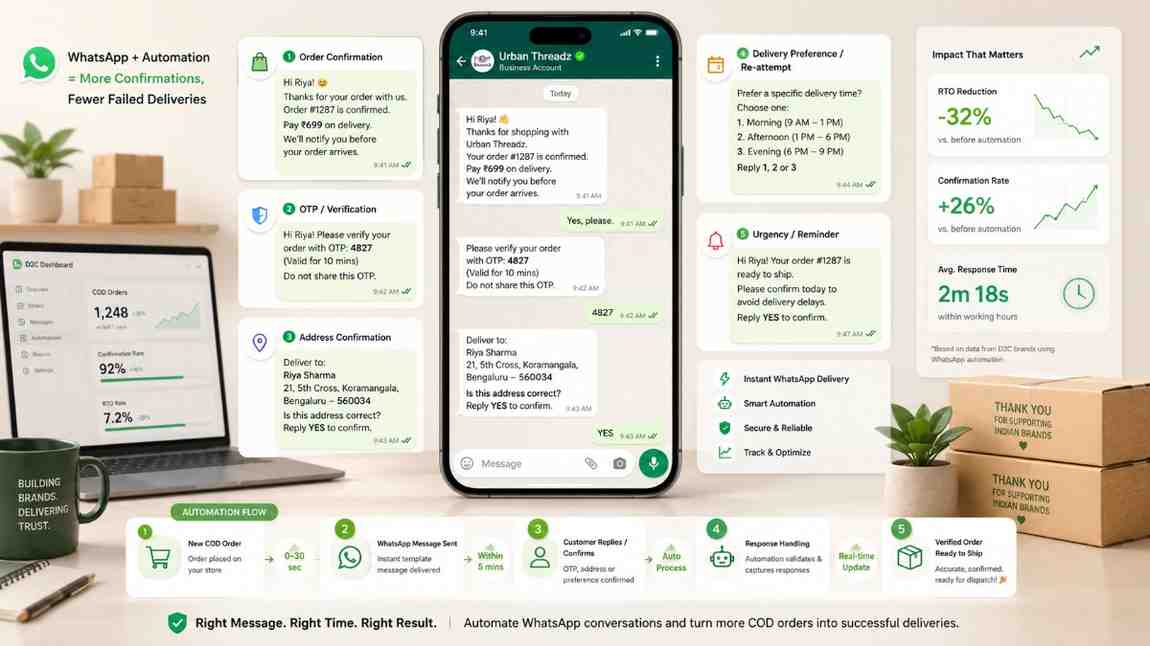
When to use: Default confirmation for all new COD orders. Triggered within 5 minutes of order placement. The template most brands start with, and the one that handles the majority of your COD volume.
Template text:
Hi {{customer_name}},

Your order #{{order_id}} has been placed!

Product: {{product_name}}
Amount: ₹{{order_total}} (Cash on Delivery)
Delivering to: {{city}}

Please confirm so we can start packing.
Quick reply buttons: [Confirm Order] [Cancel Order]
Meta variables: {{1}} = first name | {{2}} = order ID | {{3}} = product name | {{4}} = order total | {{5}} = city
Keep {{city}} as city only, not the full address. Full addresses in the body make the message long enough to truncate in WhatsApp preview, which drops response rates. If you need address verification, use Template 2 instead.
Template 2: Confirmation + Address Verification
When to use: For brands where 15%+ of NDR reasons are "wrong address" or "address not found." Combines confirmation and address check in one message, saving a second touchpoint.
Template text:
Hi {{customer_name}},

Order #{{order_id}} placed, ₹{{order_total}} Cash on Delivery.

Delivering to:
{{full_address}}

Is this address correct? Confirm to ship.
Quick reply buttons: [Yes, ship it] [Update address]
Meta variables: {{1}} = first name | {{2}} = order ID | {{3}} = order total | {{4}} = full delivery address
When the customer taps "Update address," your BSP should trigger a follow-up free-text message: "Please reply with your updated delivery address." Capture that reply and update the Shopify order before dispatch. Most major BSPs (Wati, Interakt, DelightChat) support free-text reply capture with Shopify order update via API.
Template 3: COD Confirmation + Prepaid Switch Offer
When to use: Replace Template 1 with this if you are running a COD-to-prepaid conversion programme. Works best for AOV above ₹500 in fashion, personal care, and wellness categories. Sent within 5 minutes of order placement, same trigger as Template 1.
Template text:
Hi {{customer_name}},

Your order #{{order_id}} is confirmed (₹{{order_total}} COD).

Pay online now and save ₹{{discount_amount}} instantly.
Pay here: {{payment_link}}

Offer valid for 2 hours.
Quick reply buttons: [Pay online, save ₹{{discount_amount}}] [Keep COD]
Meta variables: {{1}} = first name | {{2}} = order ID | {{3}} = order total | {{4}} = discount amount | {{5}} = payment link
Meta allows variables in button text, "Pay online, save ₹{{4}}" is a valid button. Making the discount amount visible in the button (not just in the body) increases tap rate. Test this: button with amount vs button without, typically 20 to 30% higher tap rate when the saving is visible on the button itself.
For customers who tap "Keep COD": immediately follow up with Template 1 or 2 as your standard confirmation. The order is now confirmed COD but still needs to be tagged before dispatch.
Template 4: Non-Responder Follow-up
When to use: Sent 4 hours after Template 1 (or 2) if no response received. This is your fallback for customers who ignored the first message. Shorter, more urgent tone. Works for orders queued for next-day dispatch.
Template text:
Hi {{customer_name}},

We have not received your confirmation for order #{{order_id}} (₹{{order_total}}).

Your order ships in 12 hours. Please confirm or cancel.
Quick reply buttons: [Confirm] [Cancel]
Meta variables: {{1}} = first name | {{2}} = order ID | {{3}} = order total
Do not send more than two WhatsApp messages before dispatch. Three messages to a customer in a short window risks a spam report, and enough spam reports will get your WhatsApp Business number flagged or banned. After Template 4 with no response, route to IVR or manual call, not a third WhatsApp message.
Template 5: Delivery Day Reminder
When to use: Morning of expected delivery. Reduces "customer not available" and "refused delivery" NDR rates. Runs independently of the confirmation sequence, triggered by the courier's out-for-delivery status event, not by the order confirmation status. Shiprocket Engage reports 30 to 45% reduction in "not available" NDRs for orders where this reminder was sent.
Template text:
Hi {{customer_name}},

Your order #{{order_id}} is out for delivery today!

Please keep ₹{{cod_amount}} ready for the {{courier_name}} delivery agent.

Not available today? Reply to reschedule.
Quick reply buttons: [I'll be home] [Reschedule]
Meta variables: {{1}} = first name | {{2}} = order ID | {{3}} = COD amount | {{4}} = courier name (Delhivery / Bluedart / Ekart / XpressBees)
Including the courier name in {{4}} reduces "I didn't know who it was" refusals. Including the exact COD amount means the customer can keep the right cash ready, reducing "I don't have exact change" delays that trigger failed delivery marks in dense urban areas like Dharavi, Lajpat Nagar, or Rajajinagar.
What Makes a WhatsApp COD Template Actually Convert
Three things kill WhatsApp COD templates before they reach the customer: Meta rejection, poor message structure, and wrong timing. Here is how to avoid all three.
Meta approval: what gets templates rejected
Submit templates under UTILITY. Approval takes 24 to 72 hours. Common rejection reasons for COD templates:
- Promotional words in a utility template, "offer," "discount," "save," "free." If your prepaid switch template leads with the discount, submit it under MARKETING instead.
- Vague sample variable content, Meta requires realistic examples. Submit {{1}} = "Priya," not "customer name." {{2}} = "#48291," not "order number."
- Button text over 20 characters, "Confirm your COD order now" fails. "Confirm Order" passes.
- Body text that looks like bulk marketing, personalise with at least two customer-specific variables (name + order ID).
Message structure that gets responses
Lead with the customer name and order number in the first line. A customer who sees "Hi Rahul, your order #48291" knows immediately this is about their specific order, not a generic blast. Messages that start with "Dear customer" or "Your recent purchase" convert at roughly half the rate of personalised openers.
State the COD amount explicitly. "₹649 (Cash on Delivery)" is better than "total amount." Customers need to know how much cash to prepare, seeing the exact figure makes the order feel real and reduces impulse cancellations from customers who ordered without thinking through the payment.
Keep the body under 300 characters where possible. Customers read the WhatsApp notification preview on their lock screen before opening the message. If your message is too long to preview, fewer people open it. Short messages get tapped faster, especially on budget Android devices common in Tier-2 and Tier-3 markets.
Timing is the single biggest variable
Send Template 1 within 5 minutes of order placement. Not 30 minutes. Not the next morning. At T+5 minutes, the customer just placed the order and is still on their phone. Response rates at T+5 minutes are 3 to 4x higher than at T+30 minutes.
This requires your Shopify order webhook to trigger the WhatsApp API immediately on order creation. Most BSPs handle this in under 60 seconds. If your BSP has more than 2-minute latency between order placement and message delivery, check their Shopify integration configuration, this is usually a webhook retry setting.
The Full Automation Playbook
The templates handle the message content. The automation flow determines whether the whole system actually reduces your RTO. Here is the complete sequence.
Step 1: Shopify webhook for COD orders
Create an orders/create webhook in Shopify filtered to COD payment method. The payment method value depends on how you set up COD, common values are "Cash on Delivery," "COD," or "Manual." Pass to your BSP: customer phone, customer first name, order ID, first product name, order total, city, and full delivery address.
BSPs with prebuilt Shopify integrations that handle this without custom code: Wati, Interakt, DelightChat, HillTeck, AiSensy. For brands needing more control, Zapier or Make (formerly Integromat) can bridge Shopify webhooks to WhatsApp API calls with a no-code setup.
Step 2: The 3-event sequence
| Message | Timing | Trigger | If no response |
|---|---|---|---|
| Template 1, 2, or 3 | T+5 minutes | COD order placed in Shopify | Wait 4 hours, then Template 4 |
| Template 4 (follow-up) | T+4 hours | No response to first template | Wait 20 hours, then IVR / manual call |
| Template 5 (delivery day) | Morning of delivery | Courier status = out for delivery | No action needed |
Template 5 is triggered by a courier tracking event, not a WhatsApp response. This requires a separate courier tracking webhook from Shiprocket, Delhivery, Ekart, or whichever aggregator you use. Most aggregators expose tracking status webhooks or polling APIs. Shiprocket Engage handles this natively, the delivery reminder fires automatically when the courier marks the shipment as out for delivery.
Step 3: Shopify order tagging by response
Configure your BSP to tag Shopify orders automatically based on what the customer does. Consistent tag names let your ops team filter and act without manual checking:
- whatsapp-confirmed, customer tapped Confirm Order. Move to fulfillment queue immediately.
- whatsapp-cancelled, customer tapped Cancel Order. Hold for 5-minute ops review before cancelling, 30 to 40% are accidental taps.
- address-update-pending, customer tapped Update Address. Hold dispatch until corrected address is confirmed.
- no-response-24h, no WhatsApp response in 24 hours. Route to IVR batch or manual call queue.
- prepaid-converted, customer completed payment from Template 3 link. Stop COD verification sequence for this order.
Step 4: IVR fallback for non-responders
After 24 hours with no WhatsApp response, the order is still unverified. Route these to an IVR batch call if your volume justifies it. Shiprocket Engage and HillTeck both run combined WhatsApp + IVR flows natively, Shiprocket Engage claims 60 to 70% of orders confirmed within 3 hours with this combined approach, at ₹4.99 per processed order.
For brands below 400 COD orders per month, manual calls for non-responders are often faster and cheaper than setting up IVR infrastructure. The 10 to 15% of orders that need manual follow-up typically takes 45 minutes of calling time at this volume.
Tools comparison
| Tool | Pricing | WhatsApp + IVR | Best for |
|---|---|---|---|
| Shiprocket Engage | ₹4.99/order processed | Yes, combined | Brands already on Shiprocket aggregator |
| HillTeck | Per-order pricing (Shopify App) | Yes, combined | Shopify-native setup, prepaid conversion |
| Wati | Monthly platform + per-message | WhatsApp only | Custom flow requirements, flexible logic |
| DelightChat | Monthly platform fee | WhatsApp only | Prebuilt COD flow, strong Shopify sync |
| AiSensy | Monthly platform + per-message | WhatsApp only | Combined marketing + utility from one tool |
How to Handle Each Response Type
The template triggers the conversation. What you do after each response determines whether your RTO actually goes down.
Customer confirms
Auto-tag the order as "whatsapp-confirmed" and release to fulfillment queue. No further verification needed. If your ops flow includes a packing confirmation message ("Your order is packed and ready to ship!"), send it, this reduces post-confirmation cancellation requests from customers who get nervous after confirming.
Customer cancels
Do not auto-cancel. Tag as "whatsapp-cancelled" and route to a 5-minute ops review. Roughly 30 to 40% of WhatsApp cancellations are accidental, particularly when the Confirm and Cancel buttons appear adjacent and the customer taps the wrong one on a small screen. A quick WhatsApp reply ("Hi Rahul, did you mean to cancel order #48291?") recovers a significant portion of these.
Customer requests address update
Immediately send: "Please reply with your updated delivery address." Capture the free-text reply. Your BSP should map this to a Shopify order update via API. Hold the order in "address-update-pending" state, do not dispatch until the corrected address is confirmed. This single step eliminates most address-driven RTOs that would have otherwise shipped to a wrong pincode.
Customer does not respond
After Template 4 with no response, you have options based on order profile:
- High AOV (above ₹800) + serviceable pincode: dispatch anyway. The RTO risk is worth taking on a genuine order. Most of these are real customers who were busy.
- Mid AOV (₹300–₹800) + neutral pincode: route to IVR for one call attempt before dispatch.
- Low AOV (below ₹300) + high-RTO pincode: consider auto-cancellation. The RTO cost may exceed the order margin. Set a clear internal policy for this, ambiguity leads to inconsistent ops decisions.
Customer switches to prepaid via Template 3
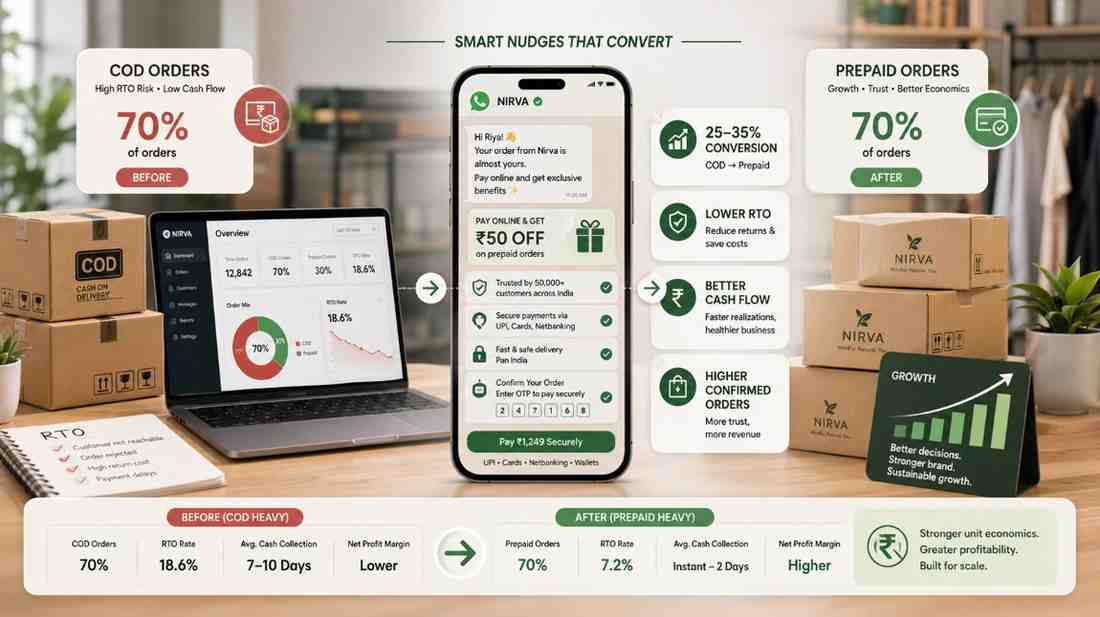
When the payment link is completed, Shopify marks the order as paid. Your WhatsApp automation should detect the payment status change and stop the COD verification sequence for that order, Template 4 and subsequent messages should not fire. Tag the order as "prepaid-converted" and track this number weekly. A 10% prepaid conversion rate on COD orders is achievable for most D2C categories at ₹40 to ₹60 incentive.
Benchmarks: What Good Looks Like
These are realistic numbers for Indian D2C brands running WhatsApp COD verification. Your actual numbers will vary by category, pincode mix, and how quickly Template 1 fires. Use these as targets for your first 90 days.
| Metric | Median (Indian D2C) | Top quartile |
|---|---|---|
| WhatsApp message delivery rate | 82–88% | 90%+ |
| Response rate to Template 1 | 50–60% | 65–70% |
| Confirmation rate (among responders) | 80–88% | 88–92% |
| Effective verification rate at T+24h | 45–55% | 60–70% |
| RTO rate: verified COD orders | 14–18% | 10–14% |
| RTO rate: unverified COD orders | 28–35% | - |
| Delivery day reminder, not-available NDR reduction | 30–40% | 40–45% |
The gap between verified (14 to 18%) and unverified (28 to 35%) RTO rates is the core economic case for the entire setup. You are not eliminating RTOs, you are filtering orders most likely to RTO before dispatch, and giving genuine customers a clean way to cancel rather than refuse delivery.
If your Template 1 response rate is below 40%, check timing first (most common issue: more than 15 minutes after order placement) and then phone number quality (checkout numbers that are not registered on WhatsApp). Fix those before changing template copy.
If your confirmation rate among responders is below 75%, the issue is not the template, it is product-market fit or a trust gap. Customers who second-guess the order when asked to confirm usually placed it impulsively. Address this with better product page content, visible return policies, and delivery trust signals, not with template rewrites.
Quick benchmark check: If you are running 1,000 COD orders a month with a 55% WhatsApp response rate and 85% confirmation rate, you are verifying roughly 467 orders. Track your RTO rate separately for confirmed vs unconfirmed orders. The difference tells you exactly what verification is worth for your specific brand, not a benchmark figure, your actual number.
The five templates above cover 90% of COD verification scenarios Indian D2C brands run into. The automation, Shopify webhook, BSP trigger, order tagging, IVR fallback, takes one to two days to set up with any of the tools listed above.
If you want checkout-layer controls alongside WhatsApp verification, COD suppression for high-RTO pincodes, a prepaid nudge at the payment step, or a one-click payment link for COD-to-prepaid conversion, OneflowAI handles the checkout and post-order verification flow together, without stitching separate tools for each step.
FAQ: WhatsApp COD Confirmation Templates
Do I need the WhatsApp Business API or can I use the WhatsApp Business App?
You need the API. The WhatsApp Business App supports only manual conversations, you cannot trigger automated template messages from it or connect it to Shopify. API access is through a BSP (Wati, Interakt, AiSensy, DelightChat, HillTeck). Most BSPs have a monthly platform fee plus ₹0.50 to ₹0.70 per utility conversation. Below 200 COD orders a month, manual messages from the Business App is cheaper. Above 500 orders, the API is the only scalable option.
How long does Meta approval take for a COD confirmation template?
24 to 72 hours for utility templates. Common rejection reasons: button text over 20 characters, promotional words in a utility template body, vague sample variable values. Meta provides a reason on rejection, fix it and resubmit. A properly formatted utility template typically gets approved in the second submission if not the first.
What if the customer replies in Hindi or a regional language?
Quick reply button taps are language-agnostic, the customer taps Confirm Order or Cancel Order regardless of what language they speak. Free-text replies are the issue. If a customer types in Hindi, your BSP automation may not recognise it as a confirmation. Most enterprise BSPs support Hindi and major regional language keyword matching, verify this with your BSP before going live on a high-volume COD category.
What is the difference between a utility and marketing WhatsApp template?
Utility: post-purchase transactional messages, order confirmations, delivery updates, payment reminders. Cost ₹0.50 to ₹0.70 per conversation, better deliverability. Marketing: promotional messages, sale announcements, discount codes, new launches. Cost ₹0.80 to ₹1.20, and customers can opt out. COD order confirmation is utility. If your prepaid switch template leads with "save ₹50," Meta may reclassify it as marketing, keep confirmation language primary and discount language secondary in the template body.
At what COD order volume does WhatsApp verification become worth setting up?
At 200+ COD orders per month, the RTO savings typically exceed the setup effort and tool cost. At 500+ orders per month, the monthly logistics savings are 5 to 10x the BSP platform fee. Below 200 orders, manual WhatsApp messages from the Business App are faster to start and the savings are smaller, most brands below this volume do not need the full automation stack.
Can I send Template 5 (delivery day reminder) through Shiprocket directly?
Yes. Shiprocket Engage handles delivery day WhatsApp reminders natively, no separate BSP setup needed if you are already on Shiprocket. The reminder fires automatically when the courier marks the shipment as out for delivery. ClickPost and Unicommerce also support automated delivery WhatsApp notifications. If you are using Shiprocket as your primary aggregator, Shiprocket Engage is the fastest path to get Template 5 running.
What happens if the customer's number does not have WhatsApp?
The message does not deliver. Your BSP reports a delivery failure. Route non-delivered orders to IVR or SMS fallback. In rural areas and Tier-3 pincodes, non-WhatsApp numbers can be 15 to 25% of your customer base. Plan for this in your fallback logic, WhatsApp-first with automatic IVR fallback for delivery failures is the standard setup.
Should I send WhatsApp confirmation before or after a COD OTP at checkout?
These address different problems. OTP at checkout confirms the phone number is real before the order is placed, preventing fake orders from entering your system. WhatsApp confirmation post-order confirms the customer actually wants the shipment before you pick up and dispatch. Run OTP at checkout if fake order rate is a problem, then WhatsApp confirmation post-order for intent verification. You do not need to choose between them.
What should I do if a customer does not respond after both WhatsApp messages?
After Template 1 and Template 4 with no response, the order remains unverified. Standard decision framework: dispatch for high-AOV orders in serviceable pincodes, route to IVR for mid-AOV orders, consider cancellation for low-AOV orders in high-RTO pincodes where the expected RTO cost exceeds the order margin. Do not send a third WhatsApp message, two in a short window is the limit before risking a spam report that can get your number flagged.
Do WhatsApp confirmation rates vary by product category?
Yes. Fashion and accessories see higher cancellation rates (customers change their mind when asked to confirm an impulse buy). Electronics and health supplements see higher confirmation rates (orders placed more deliberately). Gifting categories spike around festivals, for Diwali and Valentine's season, send the delivery day reminder two days before the expected delivery window and again on the day, not just once, since delivery timing matters for gift purchases.
WhatsApp COD confirmation is one of the highest-ROI ops changes Indian D2C brands can make. The templates are straightforward, the automation is low-code, and the economics are clear: ₹0.70 per conversation versus ₹200 to ₹300 per RTO. Brands not running this are essentially paying courier partners to ship unverified COD orders into a 26% RTO rate.
Start with Template 1. Set up the Shopify webhook with your chosen BSP. Measure response rate and confirmation rate for 30 days. Then add Template 4 as a follow-up fallback and Template 5 as a delivery day reminder. The full three-template sequence takes a weekend to implement and typically pays for itself in the first week of reduced RTOs.
- Shipway ShipNotes RTO data via Mediabrief
- WhatsApp Business API pricing India 2026
- Meta WhatsApp Business template guidelines
- Shiprocket Engage Shopify App Store listing
- Unicommerce India D2C Report 2026

Omkar Kamble builds OneflowAI, which shows consumer brands what every order really earned after RTO, freight and COD. These guides come from real order and courier data, not theory. Figures we cannot independently verify are flagged.
Published 9 June 2026 Last reviewed 9 June 2026 15 min read